For PC builders, enthusiasts, and IT professionals, few things are as nerve-wracking as cleaning a motherboard. It is the central nervous system of the computer, packed with delicate capacitors, intricate trace pathways, and sensitive slots.
We all know that accumulated dust acts as an insulator, trapping heat and leading to thermal throttling or component failure. While compressed air is great for loose surface dust, it does nothing for the sticky grime, oily fingerprints, or leftover manufacturing solder flux that can cause connection issues over time.
This brings up the common question: Is it safe to use liquid contact cleaner on a motherboard?
The short answer is yes, absolutely—but only if you use the right kind of cleaner.
Using the wrong chemical (like standard household cleaners or automotive brake cleaner) can melt plastic connectors and destroy your PC. However, using a specialized precision electronics cleaner is standard procedure for professional refurbishment.
Here is why your motherboard needs more than just air, and how to safely use XPERTCHEMY® to restore it.
Why Compressed Air Isn’t Enough
A motherboard is a dense landscape of components. Over time, humidity in the air mixes with dust to create a conductive sludge that hides deep inside RAM slots, PCIe sockets, and under heatsinks. Furthermore, new boards often have sticky residues left over from manufacturing flux.
To remove these contaminants, you need a solvent that can penetrate tight spaces, dissolve the grime, and then evaporate completely without leaving a conductive residue behind.
The Professional Solution: XPERTCHEMY® Contact Cleaner
You need a product specifically formulated for delicate electronics. A “wet” cleaner that stays liquid too long increases the risk of short circuits when you power the system back on.
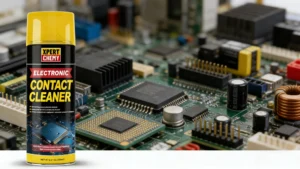
XPERTCHEMY® Contact Cleaner (450ml) is engineered specifically for this task. It uses a fast-acting solvent designed to safely dissolve dirt, dust, grease, and stubborn flux deposits upon contact. Crucially, its formula is engineered to be harmless to most plastics used in PC connectors and paper tags found on components.
It is designed to penetrate hard-to-reach places—like the bottom of a DIMM slot or inside a USB port—lift the contaminants, and flush them away.
Distributor Note: For professional repair shops needing a reliable, quick-drying solution in bulk, we offer wholesale supply of XPERTCHEMY® Contact Cleaner in optimal 450ml cans to keep your service benches stocked.
Step-by-Step: How to Safely Clean Your Motherboard
If you are troubleshooting a flaky RAM stick, a GPU that isn’t detected, or just performing deep maintenance, follow these steps for a safe clean.
1. The Golden Rule: Power Down Completely Never introduce any liquid to a powered system. Turn off the PSU switch, unplug the power cable from the wall, and press the chassis power button several times to discharge any residual electricity stored in the capacitors.
2. Remove Loose Debris Start with compressed air to blow away the “dust bunnies.” You want the contact cleaner to work on stuck-on grime, not loose dust.
3. Apply XPERTCHEMY® Contact Cleaner Identify the dirty areas—such as RAM slots, PCIe lanes, or I/O ports. Use the precision straw to spray short bursts directly into the target area. You will see the cleaner immediately begin to flush out dark, dirty liquid. Because XPERTCHEMY® penetrates hard-to-reach places, you don’t need to flood the board; short, targeted sprays are efficient.
4. The Critical Step: Let It Dry A major feature of XPERTCHEMY® is that it dries quickly, evaporating completely and leaving zero residue. However, you must ensure it is 100% dry before reapplying power. Wait at least 10-15 minutes in a well-ventilated area. If you sprayed deep into slots, give it extra time to ensure no liquid remains trapped under components.
Conclusion
Cleaning a motherboard doesn’t have to be scary. With the right solvent, it’s a necessary maintenance step that can lower temperatures and fix frustrating connectivity issues. By using a specialized product like XPERTCHEMY®, you ensure that sensitive components remain safe while effectively stripping away conductive grime.